What are the game controls used in Cash Cuisine?
Game Controls
- Buy Ticket – Submit the bet and starts the round, changes to a Reveal All button.

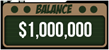
- Balance – Display user balance.
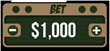
- Bet (-/+) – Display current bet. Enable adjustment of the bet.
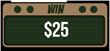
- Win – Display current round win.
- Auto Bet – Enables playing the game automatically for a predetermined number of spins at the current bet configuration. See Auto-bet Chapter.

- Help – Opens the game help pages.

- Full-Screen Toggle – Switch to full screen and back.

- Home – Exit game.

- Sound – Enables sound volume control.

- Cashier – Opens player account.

Autobet Settings
To use the auto bet a player press the auto bet icon next to the “Buy ticket” button.
Autobet – Enables playing the game automatically for a predetermined number of spins at the current line bet configuration.
To set a number of rounds, press the CHANGE AUTOBET ROUNDS and then select the desired value of rounds.
To add limits, open the setting panel using the [+] sign.
Each setting can be set to on or off using the on/off switch.
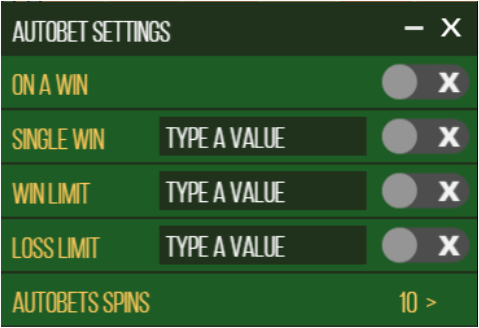
Some limits require a numeric value that must be entered before auto-bet activation.
Limits without a valid numeric value will turn off once auto-bet is activated.
To close the setting panel press the [-] button.
To start an auto-bet session, press the PLAY button.
To Pause an auto-bet session, press the Pause button.
To exit the Auto-bet mode press the [X] button.

Auto-Bets Limits:
- Loss Limit (Numeric value) - Pauses the auto bet function (see below) when the total loss of the user so far (SUM(bet)-SUM(win)) >= (Numeric value)
- Single Win (Numeric value) - Pauses the auto bet function (see below) when a single win payout >= (Numeric value) or more.
- Win Limit (Numeric value) - Pauses the auto bet function (see below) when the total Win of the user so far (SUM(bet)-SUM(win)) <= (Numeric value)
- Stop on Win - When any single round results with a win of any size, auto-bet deactivates.
- Each limit can be turned on or off by pressing on the onoff button next to it.
- To set the number of auto-bets rounds, the player picks the desired value from the top list of optional values by clicking on the desired value. The selection mark is set on the last settings.
- When a limit is reached and the Auto-bet stops, a message pops in the center of the screen reading according to the limit:
- "LOSS LIMIT REACHED"
- "WIN LIMIT REACHED"
- "SINGLE WIN REACHED"
- "WIN REACHED"
Message will fade out after 5 sec or on any tapping (screen or button pressed)
To exit the auto bet panel, the player can:
- Start the auto-bet rounds by clicking “START”.
- Exit auto-bet completely by clicking the “return to game” button on the right.
Auto-Bet in the UK
Players from the UK who want to use the auto-bet feature must set a loss limit before engaging the auto-bet.
Any attempt to start auto-bet play with no valid value set in the loss limit field or the number of rounds will be denied.
The Loss limit is on all the time and cannot be disabled.
The Loss limit is visible for UK players all the time the auto-bet panel is open.
Article Number: 1108
Author: May 23, 2017
Last Updated: May 26, 2017
Author: Editor Taiwan [cttwEditor@titansoft.com.sg]
Online URL: https://help.sbobet.com/article/what-are-the-game-controls-used-in-cash-cuisine-1108.html