What are the mobile game controls used in Royal Charm?
Game Controls
- Play – Start a Round

- Random – Open an help page that explains the function of the Royal Charm bonus feature

- Reveal All – Reveal all the Squares together

- Auto-bet – Opens auto-bet settings

- Pay Table – Open the pay table pages

- Home – Exit game to home/lobby of host.

- Settings – Opens settings page of game

- Bet – Display the stake for the current round.when click it will open the stakes list

- Balance – Display player balance
- Win – Display the win for the current round

All game settings and info pages such as help and paytable are accessed by clicking the settings icon.
Setting Auto-bet - Mobile
The player needs to press the auto-bet floating icon, right above the spin icon, in order to enter the auto-bet settings page.
Auto-bet settings can also be reached through the game settings (Settings=>Auto-bet)
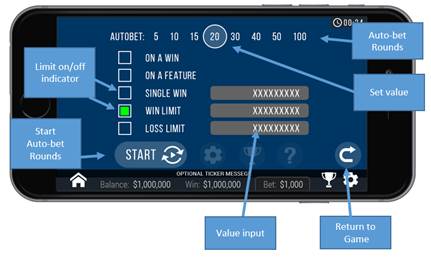
Schematic description of the setting elements:
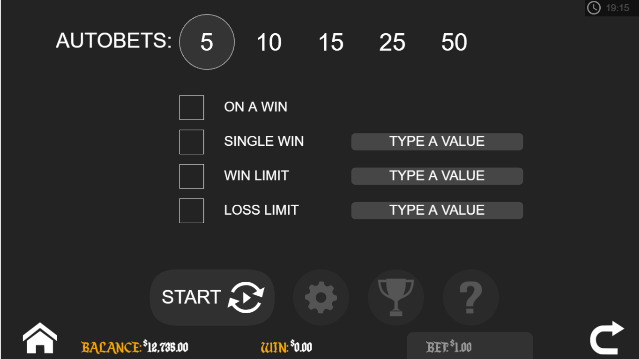
Actual game settings:
Auto-Bets Limits:
- Loss Limit (Numeric value) - Pauses the auto bet function (see below) when the total loss of the user so far (SUM(bet)-SUM(win)) >= (Numeric value)
- Single Win (Numeric value) - Pauses the auto bet function (see below) when a single win payout >= (Numeric value) or more.
- Win Limit (Numeric value) - Pauses the auto bet function (see below) when the total Win of the user so far (SUM(bet)-SUM(win)) <= (Numeric value)
- Stop on Win - When any single round results with a win of any size, auto-bet deactivates.
- Each limit can be turned on or off by clicking on the toggle button next to it.
- To set the number of auto-bets rounds, the player picks the desired value from the top list of optional values by clicking on the desired value. The selection mark is set on the last settings.
- When a limit is reached and the Auto-bet stops, a message pops in the center of the screen reading according to the limit:
- "LOSS LIMIT REACHED"
- "WIN LIMIT REACHED"
- "SINGLE WIN REACHED"
- "WIN REACHED"
Message will fade out after 5 sec or on any tapping (screen or button pressed)
To exit the auto bet panel, the player can:
- Start the auto-bet rounds by clicking “START”.
- Exit auto-bet completely by clicking the “return to game” button on the right.
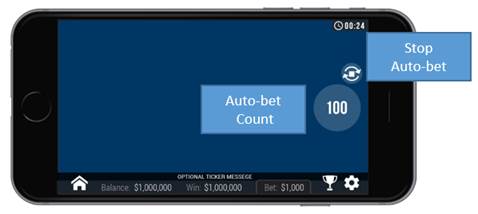
Auto-Bet Active View:
When the auto-bet is activated, the player is returned to the game view.
The spin button is replaced by a counter displaying the remaining auto-bet rounds.
The auto-bet button is changed into “Stop auto-bet” icon.
Clicking on the “stop auto-bet” or on the counter stops the auto bet and returns to regular game mode.
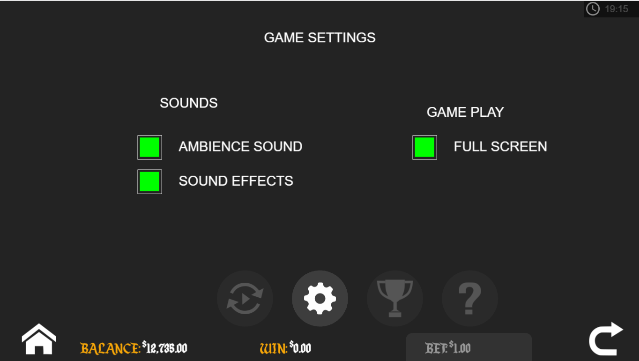
Game Settings Page
- Setting sound – Ambience Sound – enabling or disabling background music.
- Setting sound –Sound effects – enabling or disabling the sound effect.
- Full-Screen – enabling or disabling Full-screen mode- this option is not available on iOS.
Article Number: 1053
Author: Feb 6, 2017
Last Updated: Apr 14, 2021
Author: Editor Taiwan [cttwEditor@titansoft.com.sg]
Online URL: https://help.sbobet.com/article/what-are-the-mobile-game-controls-used-in-royal-charm-1053.html